DBML to ER Diagram
Paste DBML and instantly render an interactive entity-relationship diagram — drag, arrange, and export. A free, in-browser DBML viewer.
Open the diagram tool →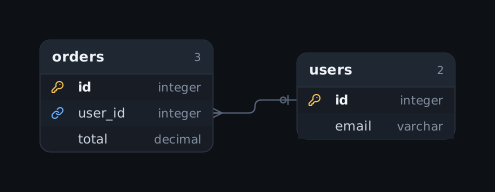
At a glance
- What it is
- SQL to ER Diagram is a free, open-source browser tool that turns DBML into an interactive entity-relationship (ER) diagram.
- Input
- DBML (Database Markup Language) text.
- Output
- An interactive ER diagram you can rearrange, then export as PNG, SVG, Mermaid, DBML or PlantUML, or share as a link.
- Cost
- Free. MIT-licensed open source. No account or signup.
- Privacy
- Runs entirely in your browser. The schema is never uploaded, and share links carry the diagram in the URL fragment, which is not sent to a server.
- Limits
- It never connects to your database itself: you paste schema text, or run one read-only catalog query in your own client and paste the result. There are no accounts, so there is no real-time multi-user editing; diagrams are kept in your browser, as a saved file, or as a share link. Layout stays smooth at around 300 tables.
How it works
- Copy your DBML (from dbdiagram.io or a
.dbmlfile). - Paste it into the editor — DBML is auto-detected.
- Tables and
Ref:relations are drawn immediately. - Arrange, hide tables, then export PNG/SVG or convert to Mermaid/PlantUML.
Example
DBML like this:
Table users {
  id integer [pk]
  email varchar [unique]
}
Table orders {
  id integer [pk]
  user_id integer [ref: > users.id]
  total decimal
}
…renders two tables with a relation from orders.user_id → users.id. Try it with your own →
Guide
This is the dbdiagram-style rendering flow, without the account: export your DBML from dbdiagram.io (Export → DBML), or grab any .dbml file from your repo, paste it here, and the diagram appears immediately. From there it diverges from dbdiagram in useful ways:
- You can rearrange by hand. Drag tables into domain groups — the auto-layout is a starting point, not a cage.
- You can hide tables. Presenting the billing schema? Hide the other 80 tables and screenshot only what matters.
- Exports go both ways. PNG and SVG for docs, but also Mermaid for Markdown and PlantUML for Confluence — DBML in, any format out.
Everything runs locally: the paste, the parse, the render. For internal schemas at companies with strict data policies, that's the reason this page exists — no upload step to argue with security about. The share link (if you use it) encodes the whole diagram in the URL fragment itself; there's no database on the other end holding your schema.
Why use it
- Private: everything runs in your browser — nothing is uploaded or stored on a server.
- Interactive: drag tables, auto-arrange, hide noise, add notes, and manually link columns.
- Convert DBML to Mermaid, PlantUML, PNG or SVG.
- Free & open source — no account, no sign-up.
FAQ
Is this a free dbdiagram alternative?
Yes — paste DBML and get an interactive diagram for free, with no account. You can also export to Mermaid, PlantUML, PNG or SVG.
Does it support Ref and inline references?
Yes — both standalone Ref: lines and inline [ref: > table.col] settings are parsed.
Is my schema uploaded anywhere?
No. Everything runs locally in your browser — your schema is never uploaded to or stored on any server.
Is it free?
Yes. It is completely free and open source, with no account or sign-up required.